Hi there,,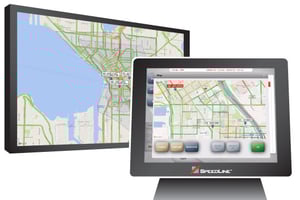
SpeedLine’s delivery functionality is built to keep your orders flying out the door seamlessly and efficiently, so you can focus on growing your business.
1. Dispatch SMS Messages
Streamline the delivery process when you send your customers a customizable text message (SMS) notification upon driver dispatch. This helps keep your customers informed while reducing the number of customers calling the store to inquire about their order status.
.jpg?upscale=true&width=800&upscale=true&name=SMS-text-message%20(2).jpg)
2. Dispatch Orders With Ease
Dispatch delivery drivers from an interactive map view to easily group orders together for delivery by touching pushpins on the map. Quoted times, estimated return times, and order totals are displayed at a glance.

3. Create Delivery Zones That Make Sense
Set custom delivery zones with adjustable boundaries so delivery fees are always correct. Customers are auto-assigned to zones based on their address, where they’ll be charged according to their area. Set order minimums or time frame restrictions for certain zones to minimize low-profit routes while protecting your staff.

4. Access Key Metrics And KPIs At A Glance
Access your delivery reporting in-store or remotely with Cloud Reporting and Analytics. Get up-to-the-minute delivery performance stats or deep dive into delivery reports for further insights with:
- Driver out-the-door time, on-the-road time, on-time deliveries, run size, and wait time between runs
- Late deliveries per timeframe
- Detailed ticket-level summary of daily deliveries
- Hourly sales by order type
- Driver fees and mileage (by odometer and suggested route)
- Tip totals